 Tax Guidelines
Income Tax Return Verification and its Procedure
The process of filing for Income Tax Returns is becoming easier and quicker through e-filing procedure with many taxpayers opting for it.
ITR-V is referred to the Income Tax Return Verification Form which is a single page document. A taxpayer receives ITR-V during filing of Income Tax Return online. ITR-V Form is filled and then sent to Income Tax Department who will verify the authenticity of the application.
ITR-V can also be defined as an acknowledgement slip generated after filing an Income Tax Return online. For AY 2026-27, if the return is not e-verified, the signed ITR-V must be sent by ordinary or speed post to Centralized Processing Centre, Income Tax Department, Bengaluru - 560500, Karnataka, within 30 days of filing. The password required for opening Form ITR-V is the taxpayer's PAN in lower case followed by the Date of Birth in DDMMYYYY format.
Prepare Early for next ITR filing
- Least complicated ITR e-filing in the industry
- E-file your ITR in a few simple steps
- Expert Assistance over Chat and Email
- Click to go through the procedure for e-filing here

E-verification: the faster alternative to posting ITR-V
Taxpayers who e-verify their return do not need to send the ITR-V form to CPC Bengaluru at all. The Income Tax Department recommends e-verification, which can be completed instantly using an OTP on the mobile number registered with Aadhaar, an Electronic Verification Code (EVC) generated through a pre-validated bank account, demat account, net banking or ATM, or a Digital Signature Certificate. See our e-verification guide for each method.
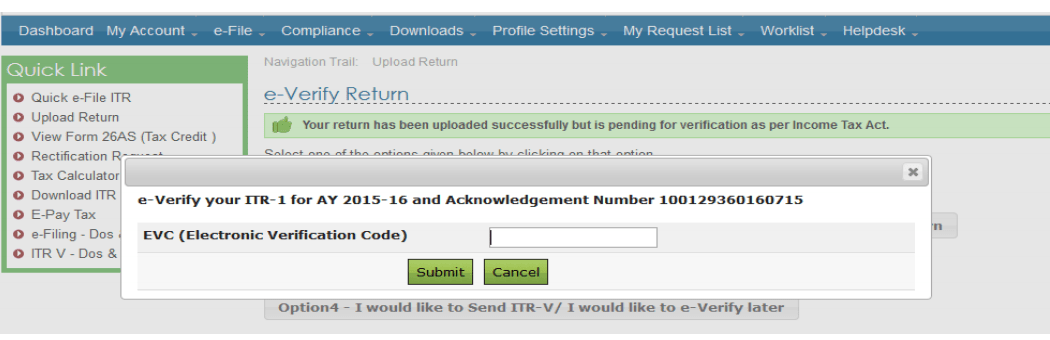
- Ensure PAN is linked with Aadhaar and the mobile number is registered with Aadhaar.
- Choose Aadhaar OTP as the e-verification option; an OTP arrives on the registered mobile number.
- Enter the OTP to complete verification instantly; no physical ITR-V is needed.
The procedure to follow while sending ITR-V to CPC, Bengaluru
- The ITR-V should be printed clearly using dark blank ink and contain the original signature of the applicant, signed in blue coloured ink.
- The signature should not be marked on the bar code of the Form.
- The bar code and the numbers below it should be clearly visible.
- Do not staple Form ITR-V or fold it.
- Form ITR-V should be enclosed in an A-4 sized, white coloured envelope.
- The envelope must be mailed to: Centralized Processing Centre, Income Tax Department, Bengaluru - 560500, Karnataka, via speed post or ordinary post, within 30 days from the date of filing the return online.
- The ITR-V Form should not be posted by courier.
- The date on which the duly verified ITR-V is received at CPC is counted for the 30-day limit, so post it early.
- There will be no requirement for any supporting documents except for the signed ITR-V.
- Upon receiving the form, CPC Bengaluru will dispatch an email acknowledging that the form has been received.
- Finally, the acknowledgment e-mail from CPC must be forwarded to the email ID mentioned in the ITR.
If verification happens after 30 days, the date of verification is treated as the date of filing the return, and late-filing consequences can apply. A return that is never verified is treated as invalid, although a condonation-of-delay request can be submitted on the e-filing portal for genuine delays.
Frequently Asked Questions
The ITR-V or Income Tax Return–Verification Form, on the other hand, is supposed to be furnished to state that the details in the form filed by the taxpayer are verified.
Along with ITR-1 Form the following supporting documents must be submitted:
- A copy of PAN Card of the applicant.
- For salaried individuals, Form 16 is required.
- Form 16A is required for non-salaried individuals.
- Bank statement or bank passbook.
- Form 26AS.
- Proof of investments along with relevant receipts.
If a taxpayer has filed for Income Tax Returns online, he / she can easily download the ITR-V Form from the official Income Tax Department website.
- Visit the official Income Tax Department e-filing portal.
- Login with the registered credentials.
- Go to e-File, then Income Tax Returns, then View Filed Returns, and choose Assessment Year 2026-27.
- Download the ITR-V Form, and get it printed on an A4 sized paper in black coloured ink only.





